

Authentication & Access Control
Learn how Videograph secures all API access using environment‑scoped access tokens and secret keys.
How authentication works
All Videograph APIs are secured. Every request must include a valid API access token and secret key created from your organization environment in the dashboard. Each token pair is strictly scoped to that environment.
A token generated in one organization environment cannot access resources in another.
API access tokens define what environment your request operates in, ensuring isolation across development, staging, and production environments.
Generating API credentials
Use this procedure whenever you need a new token and secret for backend or server‑side integrations.
Open your organization environment dashboard
Navigate to the environment where the API token will be used. All tokens are tied to this specific environment.
Create a new API access token
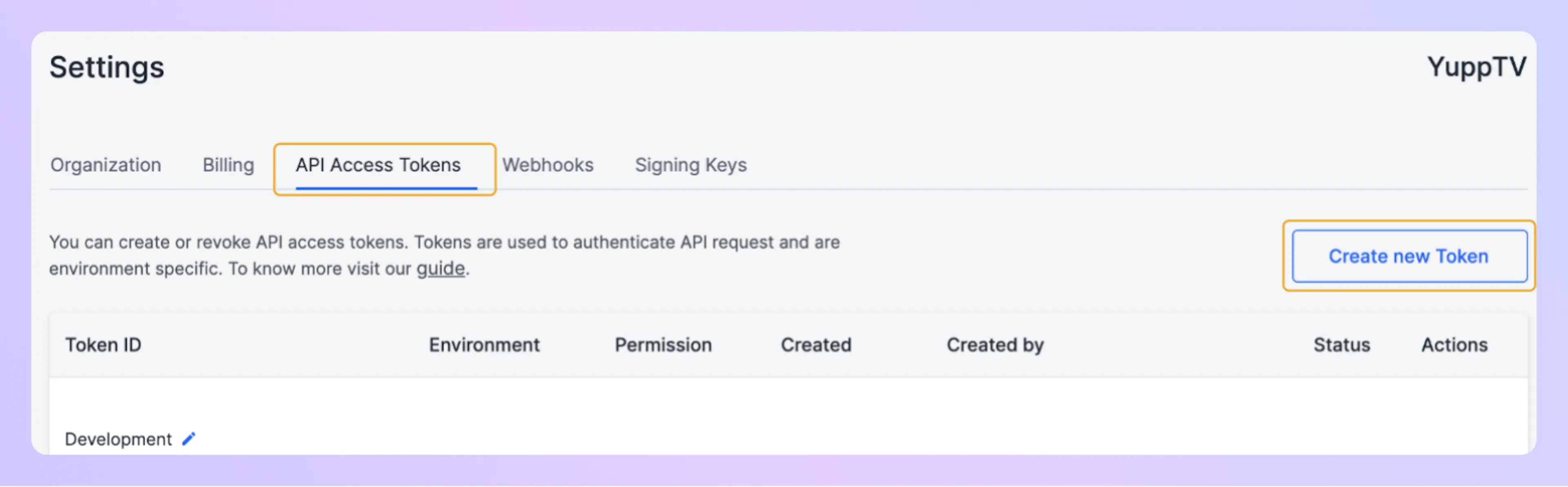
Find the API credentials section and generate a new token and secret key. Copy both values immediately; the secret is shown only once.
The screenshot below shows the Settings page with the API Access Tokens tab selected.
Store credentials securely
Save the token and secret in a secure system such as environment variables or a secrets manager.
Rotate tokens periodically and delete credentials you no longer use.
Using tokens with the API
All Videograph endpoints accept basic authentication using your token and secret key.
Basic auth example (curl)
curl --request POST \
  --url https://api.videograph.ai/video/services/api/v1/contents \
  -u "YOUR_ACCESS_TOKEN:YOUR_SECRET_KEY" \
  --header "content-type: application/json" \
  --data '{"title":"Sample upload"}'
Basic auth example (SDK-style request)
import fetch from "node-fetch";

const token = process.env.VG_TOKEN;
const secret = process.env.VG_SECRET;

const creds = Buffer.from(`${token}:${secret}`).toString("base64");

const res = await fetch(
  "https://api.videograph.ai/video/services/api/v1/contents",
  {
    method: "POST",
    headers: {
      "Authorization": `Basic ${creds}`,
      "content-type": "application/json"
    },
    body: JSON.stringify({ title: "My video" })
  }
);

console.log(await res.json());
import os
import base64
import requests

token = os.getenv("VG_TOKEN")
secret = os.getenv("VG_SECRET")

creds = base64.b64encode(f"{token}:{secret}`.encode("utf-8")).decode("utf-8")

headers = {
    "Authorization": f"Basic {creds}",
    "content-type": "application/json",
}

response = requests.get(
    "https://api.videograph.ai/video/services/api/v1/livestreams",
    headers=headers,
)

print(response.json())
Environment scoping
Access tokens are limited to the organization environment where they were created. This ensures:
-
A token cannot access data or APIs belonging to another environment.
-
Each environment (such as development, staging, or production) is fully isolated.
-
Token behavior is restricted to the environment’s configuration and permissions defined in the dashboard.
The screenshot below shows the dialog where you select the environment and permissions when creating a new token.
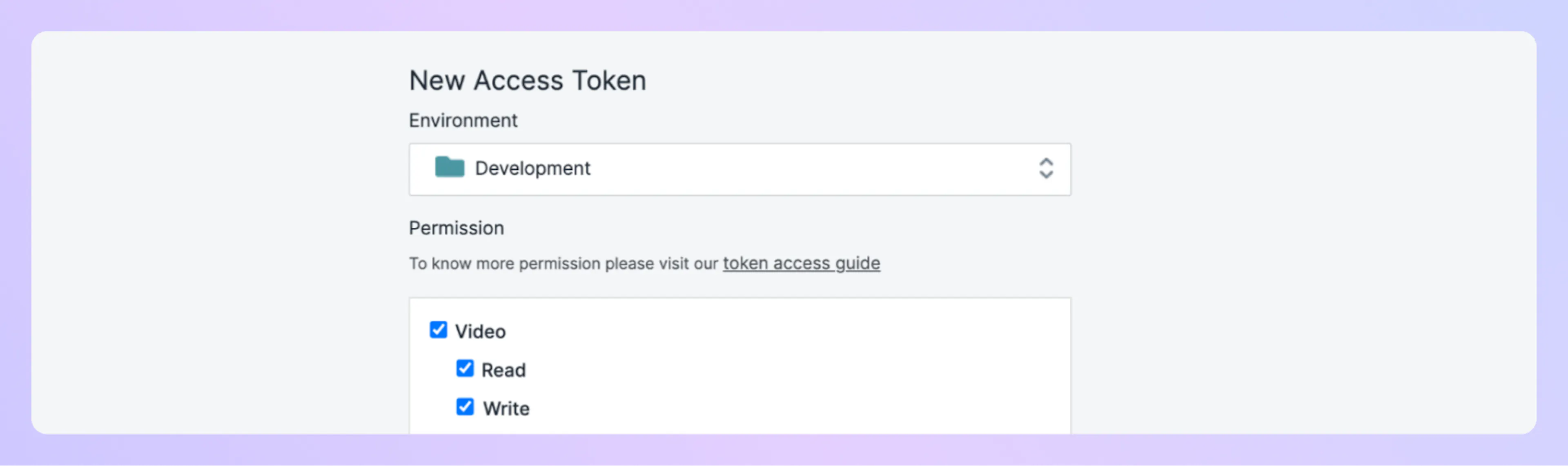
Tokens do not grant cross‑environment access. Always generate credentials inside the environment where the API integration operates.
Security best practices
To protect your video workflows and ensure proper isolation:
-
Store all tokens and secrets in a secure secrets manager or environment variables.
-
Rotate credentials regularly.
-
Revoke tokens immediately if you suspect exposure.
-
Use separate organization environments for development, staging, and production.
Never embed tokens or secrets in client‑side code, logs, or version control.